
Agentic Browsing is Google’s newest signal for a web increasingly visited by software instead of people, and it’s worth understanding before your competitors do.
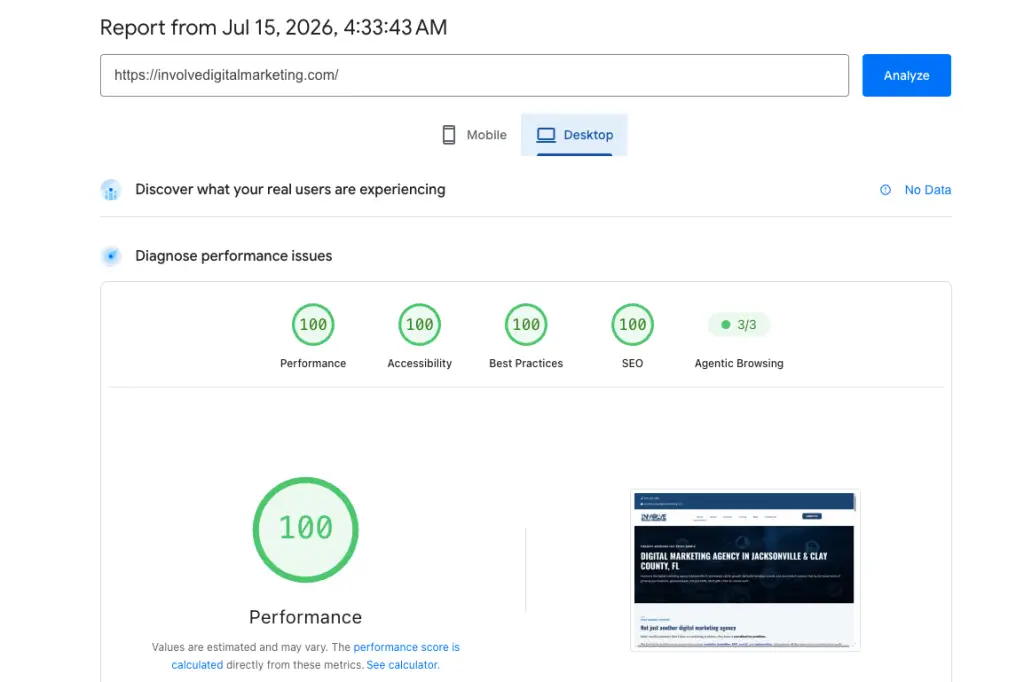
Run your website through Google’s PageSpeed Insights lately and you may have spotted something new sitting next to the familiar Performance, Accessibility, Best Practices, and SEO scores: a category called Agentic Browsing.
It appeared with little fanfare. Google added it to Lighthouse, the testing engine behind PageSpeed Insights, in version 13.3 in May 2026. Most business owners will never read the release notes. But the idea behind it is worth ten minutes of your attention, because it signals where Google believes the web is heading.
Your next visitor might not be a person. It might be a piece of software shopping on a person’s behalf.
What agentic browsing actually means
An AI agent is software that does tasks for someone instead of just answering questions. Tools like ChatGPT, Gemini, and Perplexity increasingly browse the web for their users: researching services, comparing prices, filling out forms, booking appointments.
Agentic browsing is exactly what it sounds like. Instead of a customer scrolling your site on their phone, their AI assistant visits for them, reads the page, and reports back or takes action.
We wrote about this shift earlier this year in AI Agents for Small Business and Zero-Click Search Is Here. The short version: a growing share of your future customers will first meet your business through an AI intermediary. Google’s new score asks a simple question. When that happens, will your website cooperate?
Agentic Browsing — How the score works
A few things make this category different from the others in PageSpeed Insights:
It is a checklist, not a grade. You will see a ratio like 2/3 or 3/3, a count of passed checks rather than a score out of 100.
It is marked “under development.” Google says the checks will change as everyone, Google included, figures out what actually helps agents use websites.
You are not penalized for skipping AI features. A plain, well-built page can pass every applicable check. Even example.com, the most basic page on the internet, gets a perfect ratio. This is a list of opportunities, not a penalty box.
Understanding Agentic Browsing now matters because the checks it measures are exactly what AI shopping agents rely on to complete a task on your site.
The four checks, in plain English
1. A well-formed accessibility tree
The accessibility tree is a simplified map of your page that screen readers use to describe it to visitors with disabilities. AI agents read the same map, because it is faster and cleaner than parsing raw code or interpreting a screenshot.
This is the quiet headline of the whole update: the work you do to make your site accessible to people is the same work that makes it readable to AI agents. Proper headings, labeled buttons, real link text, described images. One effort, two audiences.
2. A stable layout
If your page shifts around while it loads, a human gets annoyed. An agent gets confused. Agents often work from screenshots, and Google’s own guidance notes that a layout in motion can lead them to misread or misclick a page. This check reuses a metric Google has tracked since 2020 called Cumulative Layout Shift.
3. An llms.txt file
This is a proposed standard: a plain text file at yoursite.com/llms.txt that gives AI systems a clean, organized summary of what your site contains. The check looks for the file and, if it exists, confirms it has a proper heading, enough content, and working links. Honest caveat: adoption by the AI tools themselves is still limited, so treat this as inexpensive future-proofing rather than a ranking lever.
4. WebMCP, for sites with interactive tools
WebMCP is a new browser standard that lets a website hand an agent a set of labeled controls: book this, search that, submit this form. Lighthouse only audits it if you have implemented it, which very few small business sites have. File this one under “know it exists.” If your business runs on bookings or orders, it will matter sooner than you think.
Agentic Browsing — What we found on our own site
We do not write about tests we have not taken. When the new category first appeared, our site scored 2 out of 3 on mobile.
Two checks passed outright. Our accessibility tree was clean, which follows from the accessibility work already baked into the site. Our llms.txt file was already in place because AIOSEO, the SEO plugin we run, generates and maintains one automatically.
The check we missed was layout stability on mobile, a fraction of a second where the homepage settled into place while loading. So we fixed it. We served a smaller hero image to phones, let the browser skip below-the-fold rendering work until it is needed, and removed a stale font file. The site now tests 3 out of 3 on both mobile and desktop.
That is the honest arc. We did not start perfect, and neither will you. The fixes were ordinary, careful work, not magic.
What this means for your business
Here is the calm read. Nothing about this score affects your Google rankings today. Agentic Browsing is an early signal, not an algorithm update.
But early signals from Google have a habit of becoming expectations. Mobile-friendliness followed that path. So did page speed and Core Web Vitals. The businesses that adapted early never had to scramble.
The good news is that this checklist rewards fundamentals you should want anyway:
- Accessibility helps customers with disabilities, and now it helps AI agents recommend you.
- Layout stability keeps human visitors from misclicking, and keeps agents from misreading.
- A clear site structure helps search engines, humans, and agents alike understand what you offer.
There is no separate “AI version” of your website to build. There is just a well-built website, and a new set of visitors that notices the difference.
Three steps worth taking this quarter
- Check your score. Run your homepage through PageSpeed Insights. The Agentic Browsing ratio appears alongside your other scores. While you are there, look at Accessibility. If it is below 100, that is where to start.
- Add an llms.txt file. If your site runs on WordPress with a current SEO plugin, you may already have one. Type yoursite.com/llms.txt into a browser and see. If nothing loads, ask whoever manages your site to add it. It is a small job.
- Watch your layout. Load your site on your phone, on cellular, not Wi-Fi. Does anything jump, shift, or settle late? Each shift is a chance for a visitor, human or otherwise, to lose the plot.
None of the fixes behind a strong Agentic Browsing score require a redesign — most are configuration and content changes a developer can ship in a day.
Get a straight answer on your site
If you would rather not decode Lighthouse reports on a Tuesday night, that is what we are here for. The free 30-minute AUT.IT audit looks at your website the way both customers and AI agents now see it, and gives you the three things to fix first. No pitch deck, no commitment.
Sources: DebugBear: Google Lighthouse Has a New Agentic Browsing Category, Google web.dev: Build agent-friendly websites
What is agentic browsing according to Google’s PageSpeed Insights?
Agentic browsing refers to AI agents that browse the web on behalf of users, reading pages and taking actions or reporting back. It means your future visitors may arrive via an AI intermediary rather than a human user.
How does the Agentic Browsing score differ from other PageSpeed Insights scores?
It is a checklist, not a grade. You will see a ratio like 2/3 or 3/3 indicating the number of passed checks, rather than a single percentage out of 100.
What are the four checks in the Agentic Browsing category?
The four checks are: a well-formed accessibility tree, a stable layout, an llms.txt file, and WebMCP for sites with interactive tools.
What does a well-formed accessibility tree mean for agents and users?
An accessibility tree is a simple map of the page used by screen readers and AI agents to understand content. Proper headings, labeled buttons, real link text, and described images benefit both people with disabilities and AI agents.
What steps should I take this quarter to prepare for agentic browsing?
First, check your Agentic Browsing ratio on PageSpeed Insights and improve Accessibility if it is below 100. Second, add or verify an llms.txt file at yoursite.com/llms.txt. Third, test your layout on mobile to ensure stability and avoid shifts during loading.