
Core Web Vitals 2026 decide whether a visitor from Tampa, Orlando, Miami, Jacksonville, Sarasota, or St. Augustine waits long enough to call, book, ask for a quote, or leave for a faster rival. For Florida small businesses, website speed is not a vanity metric. It is the first thing a customer experiences, before your offer, your reviews, or your prices.
This guide explains what the Core Web Vitals 2026 metrics measure, how website speed impacts small businesses in practical terms, and which fixes to make first so slow pages stop costing you leads.
Why Core Web Vitals 2026 matter for Florida small businesses
Google’s Core Web Vitals in 2026 center on three real-world metrics: Largest Contentful Paint, Interaction to Next Paint, and Cumulative Layout Shift. Google Search Central states that Core Web Vitals are used by its ranking systems, while also noting that good scores do not guarantee top rankings. Relevance, helpful content, and overall page experience still matter.
Core Web Vitals matter because they capture the moments when a customer decides whether your site feels trustworthy, easy to use, and worth the wait. For a roofer, med spa, law firm, HVAC company, dentist, restaurant, home service firm, or local store, a slow mobile page can break the path from search to lead.
Speed is a conversion issue before it is an SEO issue
A visitor may be ready to act during lunch, after a storm, between appointments, or while comparing three local businesses. If the page loads slowly, jumps around, or freezes when they tap your call button, the problem is not just site speed optimization. It is lost leads.
That is why Core Web Vitals 2026 is as much a conversion topic as an SEO topic. Speed builds trust. A fast, stable, responsive site tells visitors your business is organized and easy to work with.
What the data says about website speed and leads
The numbers back this up. A study by Deloitte and 55, commissioned by Google and published in 2020 as Milliseconds Make Millions, analyzed 30 million user sessions across 37 brand sites. A 0.1 second improvement in mobile site speed increased retail conversions by 8.4 percent and, on lead generation sites, lifted the number of users who progressed to the form submission page by 21.6 percent. The study is a few years old, but the mechanism has not changed: faster pages keep more people moving toward the action you want.
For a Florida small business, that is the difference between a quote request and a bounce back to the search results.
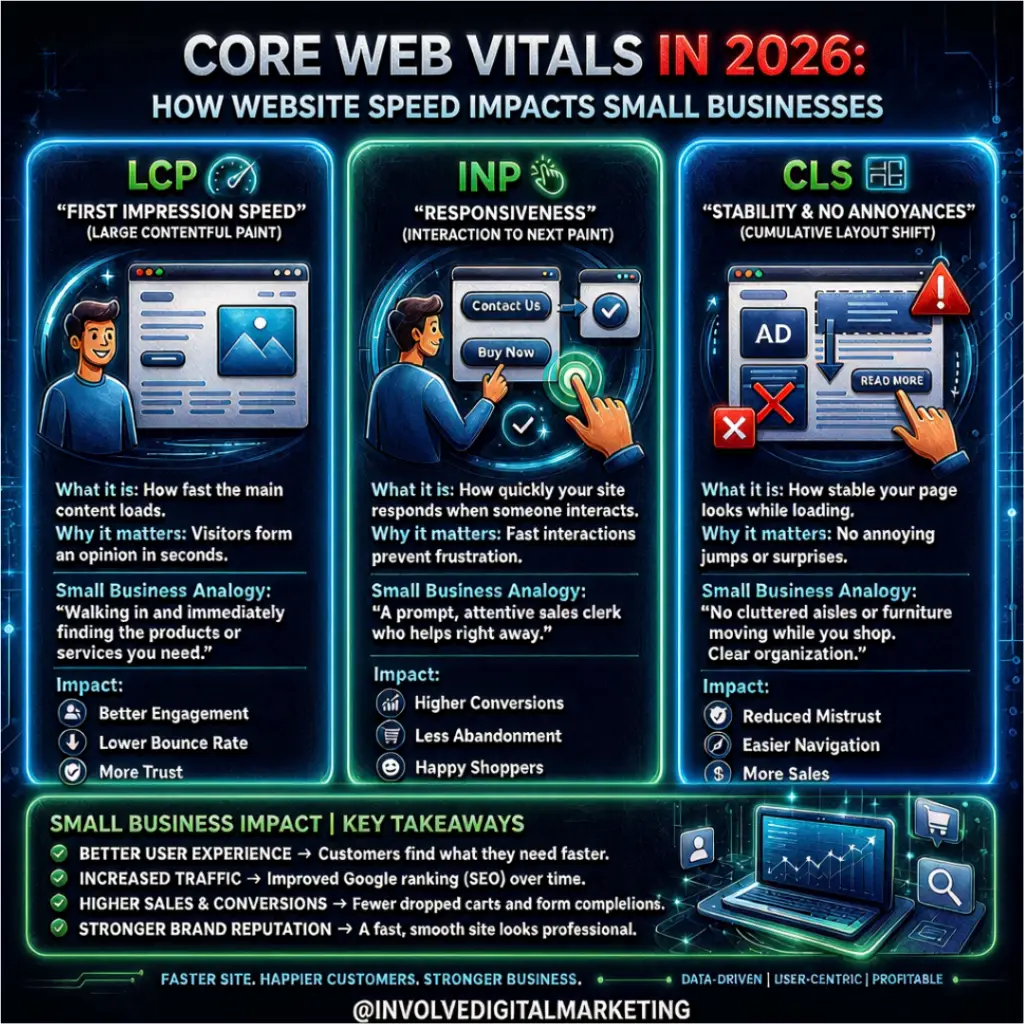
The three Core Web Vitals 2026 metrics explained in plain English
Core Web Vitals are field data metrics for loading, responsiveness, and visual stability. According to web.dev, a page passes when it scores well on all three at the 75th percentile of real user visits: LCP at 2.5 seconds or less, INP at 200 milliseconds or less, and CLS at 0.1 or less. Google explains how those Core Web Vitals thresholds were defined in its own documentation.
Largest Contentful Paint (LCP): when the page feels loaded
Largest Contentful Paint, or LCP, measures how long it takes for the main visible content to appear. On a Florida small business site, that could be a hero image, headline, service blurb, featured offer, or main product block. If LCP is slow, visitors stare at a blank or half-loaded page before they know what you offer.
Common causes include oversized images, slow hosting, blocking scripts, heavy themes, and extra sliders. On local sites, LCP problems usually show up on homepages, service pages, location pages, and landing pages with big banners. Strong messaging cannot help if users cannot see it fast.
Interaction to Next Paint (INP): whether taps and clicks feel responsive
Interaction to Next Paint, or INP, measures responsiveness after a user interacts with the page. It shows whether the page reacts quickly when someone taps a menu, clicks a booking button, opens a form, filters products, or picks a date. INP officially replaced First Input Delay (FID) on March 12, 2024, so older Core Web Vitals advice that still mentions FID is out of date.
For small businesses, INP matters because most lead actions are interactions. A form that hesitates, a sticky call button that feels slow, or a mobile menu that lags creates doubt. Visitors may not know the term INP, but they know when a site feels broken.
Cumulative Layout Shift (CLS): whether the page moves suddenly
Cumulative Layout Shift, or CLS, measures visual stability. A page with poor CLS loads a button, image, review block, or form field in a way that pushes content down after the visitor has started reading or tapping. That causes wrong taps, frustration, and abandoned actions.
Florida small businesses often add review badges, chat widgets, maps, popups, booking tools, and promo banners. These tools can be useful, but if they load in a random order, they hurt the experience. The goal is not to remove every feature. The goal is to load the right features in the right order so the page stays steady.
How website speed turns search intent into leads
A fast website shortens the path from interest to action. When someone searches for an emergency plumber in Fort Lauderdale, a wedding photographer in St. Augustine, or a personal injury lawyer in Tampa, they quickly compare several options. If your page loads smoothly and makes the next step obvious, you have a better chance of winning the call before the visitor returns to the search results.
Poor performance hurts quietly. Traffic still shows up in analytics, but calls, form fills, visits, and engagement drop. The site looks busy, yet the owner still wonders why the phones are quiet.
Speed also affects paid ads and local SEO. If you pay for clicks from search, social, or maps and send users to a slow page, the campaign looks expensive because the landing page wastes intent. If your local SEO is strong but your service pages feel slow on mobile, smoother competitors can still win the lead.
How poor performance causes lost leads
Lost leads rarely come from one Core Web Vitals 2026 score. They happen when small problems pile up during the decision process. Here are the most common ways performance problems cost Florida small businesses leads:
- The first impression arrives too late. A visitor clicks from Google but waits too long to see your main message, service area, or call to action.
- The mobile experience feels shaky. Images load slowly, buttons shift, or forms are hard to use on a phone.
- The page becomes unresponsive at the worst time. The user taps Book Now, Call, Get Estimate, or Schedule, and nothing happens.
- Third-party tools overload the page. Chat, booking, tracking, review, map, video, and ad scripts all compete for space.
- Visitors lose trust before they compare your offer. A slow site makes a good local business feel outdated.
- Analytics hides the real issue. Traffic reports show visits, but frustrated users who leave rarely leave a clear trail.
Why seasonal Florida demand raises the stakes
For seasonal and weather-sensitive Florida businesses, the impact is bigger. Demand spikes after storms, during tourist season, before holidays, and through the hot months. A slow site during a busy week wastes the traffic you worked hard to earn, and the Core Web Vitals 2026 thresholds are measured on real visits, so a surge of mobile users on weak connections is exactly when your scores are most likely to slip.
Core Web Vitals 2026 are ranking signals, not the whole SEO strategy
Core Web Vitals are part of page experience, and page experience can help in Google Search when pages are otherwise useful and relevant. Google says there is no single page experience signal. Instead, its systems use many signals that together reflect overall page experience.
This matters because a fast page with thin content will not outrank a useful competitor just because it loads quickly. But a helpful local page that is fast, stable, and easy to use has a better chance than one that makes visitors wait or struggle.
For Florida small businesses, the best path is to improve performance and substance together. Service pages should clearly explain what you do, where you do it, who you help, and what to do next. The technical setup should make that information easy to reach on mobile. Think of Core Web Vitals 2026 as support for your other SEO ranking signals: they help your best content perform because users can reach it, read it, and act on it.
Content, trust, and speed work together.
Google’s ranking systems are built to reward helpful, reliable, people-first content, not content made only to push rankings. For a Florida business, that means speed fixes should support a useful local experience, not replace it.
A fast page still needs clear service details, local signals, strong calls to action, proof, and answers to common buyer questions. A roofing page should help the visitor understand the service and request an inspection. A dental page should make the office, treatment options, and booking easy to find. A restaurant page should make menus, hours, location, and reservations easy to reach. Speed removes friction, but content builds confidence. Together, they turn the site from a brochure into a reliable lead path.
How to improve Core Web Vitals 2026 without wasting time
You improve Core Web Vitals by fixing the issues that affect real users and lead pages first. Start with your most important pages, measure them with the right tools, find the biggest blockers, and make changes that improve both speed and conversions.
Start with the pages that drive revenue.
Do not begin with every page on the site. Core Web Vitals 2026 work pays off fastest on pages closest to revenue:
- Homepage
- Main service pages
- City or location pages
- Booking or consultation pages
- Contact page
- Paid ad landing pages
- High-traffic blog posts that lead to an action
This keeps the work focused. A Florida small business does not need perfect scores on low-value pages before fixing a slow estimate form that real customers use.
Measure with the right tools.
Use more than one view of performance because each tool answers a different question. PageSpeed Insights shows field data from real Chrome users when enough traffic exists. Lighthouse finds lab issues. The Core Web Vitals report in Search Console groups affected URLs by template. Analytics shows which pages get traffic but fail to convert. Google’s page experience documentation points site owners to Search Console and Lighthouse for both measurement and fixes.
Look for patterns in your Core Web Vitals 2026 report, not just one score. If every service page has slow LCP, the issue is probably the template or hero image setup. If one booking page has poor INP, the problem is probably a scheduling widget or form script.
Fix the biggest speed blockers first.
The most useful site speed optimization work starts with basics:
- Compress and resize large images before upload, and serve them in WebP or AVIF.
- Remove unused plugins, apps, tags, and scripts.
- Delay non-essential third-party tools until after the main content loads.
- Upgrade hosting if server response time is slow.
- Limit heavy animations, sliders, and video backgrounds on lead pages.
- Preload key fonts so text renders without blocking.
- Reserve space for images, embeds, banners, and widgets to cut layout shift.
These fixes are not flashy, but they support the user path. A cleaner page loads faster, feels calmer, and makes the call to action easier to find. If the site is old enough that the fixes pile up, it may be time to weigh a redesign against a refresh and check what website design costs in Jacksonville before you commit.
A practical Core Web Vitals 2026 checklist for Florida small businesses
Use this Core Web Vitals 2026 checklist before you redesign the whole site. Most lead-loss issues show up when you use the site like a customer on a mobile connection.
- Open your site on a phone, not just a desktop, on cellular rather than Wi-Fi.
- Test your homepage and top service pages one by one in PageSpeed Insights and note LCP, INP, and CLS.
- Tap every key lead action: call, Book, quote, form, menu.
- Watch for movement while the page loads.
- Check the first screen. Can a visitor tell what you do and where you do it within two seconds?
- Review third-party scripts and remove any tool you no longer use.
- Compare traffic and leads by page to find pages that get visits but no action.
- Retest after changes and keep the before-and-after numbers.
This checklist also helps owners talk with web teams. Instead of asking for a vague faster website, you can point to the exact page, action, and problem.
When a Core Web Vitals audit makes sense
A Core Web Vitals 2026 audit makes sense when your site gets traffic but does not get enough calls, bookings, or form fills. It also makes sense before SEO, paid ads, a redesign, or a local expansion. If the base is slow, every marketing channel has to work harder. Our free digital marketing audit includes a speed check for this reason.
A good audit shows what is happening, why it is happening, and which fixes should come first. It should not drown a small business owner in jargon. The best advice links performance problems to real results, like faster first impressions, smoother forms, easier mobile use, and fewer abandoned lead actions.
For Florida small businesses, that clarity matters because local competition is close. A visitor comparing three companies will never tell you the site was slow. They choose the business that made the next step easier.
Turn website speed into a lead advantage.
Core Web Vitals 2026 are not just developer metrics. They show how quickly your Florida customers can understand your offer, trust your business, and take action. If your small business is losing leads because pages load slowly, buttons lag, forms hesitate, or mobile layouts shift, now is the time to fix the experience behind your marketing.

Want your numbers pulled and translated into plain English? Book your free AUT.IT audit. It includes a speed check on your actual site: what is slow, what it is costing you, and which fix comes first. If your site passes and the sales pitch you got elsewhere was fear-based, we will tell you that too. And if the fix turns out to be the site itself, our website design for NE Florida Businesses builds fast, mobile-first sites that are measured against these same metrics.
Frequently Asked Questions about Core Web Vitals 2026
What are the three Core Web Vitals small businesses should focus on in 2026?
The three Core Web Vitals 2026 metrics are Largest Contentful Paint (LCP), Interaction to Next Paint (INP), and Cumulative Layout Shift (CLS). LCP measures how quickly the main visible content appears, with a good score at 2.5 seconds or less. INP measures how responsive the page feels after a visitor taps or clicks, with a good score at 200 milliseconds or less. CLS measures whether the page shifts unexpectedly while loading, with a good score at 0.1 or less. Together they show whether a site feels fast, usable, and stable.
Do good Core Web Vitals scores guarantee better Google rankings?
No. Google confirms that Core Web Vitals are used by its ranking systems, but they are not the whole SEO strategy. A fast page still needs helpful content, relevance, trust signals, clear local information, and a strong overall page experience. For Florida small businesses, the best plan is to improve performance and content together.
Which pages should a small business optimize first for Core Web Vitals?
Start with pages closest to revenue: the homepage, main service pages, city or location pages, contact page, booking or consultation pages, paid ad landing pages, and high-traffic blog posts that lead to a call, form, or appointment. This keeps you from chasing perfect scores on low-impact pages while key lead pages stay slow.
Why is INP especially important for local lead generation?
INP matters because most lead actions are interactions. When a visitor taps Call, Book Now, Get Estimate, opens a menu, or submits a form, the site should respond within 200 milliseconds. If the page hesitates or feels frozen, the visitor loses trust and chooses a competitor. Since INP replaced FID in March 2024, Core Web Vitals 2026 work has to cover both loading speed and post-click response.
When should a Florida small business consider a Core Web Vitals audit?
A performance audit makes sense when a site gets traffic but does not produce enough calls, bookings, or form fills. It is also useful before SEO, paid ads, a redesign, or a local expansion. A good audit explains the problem, why it is happening, and which fixes will improve real results, like faster first impressions, smoother forms, easier mobile use, and fewer abandoned lead actions.
Sources
- web.dev: Web Vitals (Google), metric definitions and thresholds
- web.dev: How the Core Web Vitals metrics thresholds were defined
- web.dev: INP replaces FID as a Core Web Vital, March 12, 2024
- Google Search Central: Understanding page experience in Google Search results
- Google Search Central: Creating helpful, reliable, people-first content
- Deloitte and Google: Milliseconds Make Millions (2020)